Intelligent Background Fill
Easily handle ratio mismatches by filling gaps with solid colors, Gaussian blur, or custom brand images to maintain visual appeal.
Replace manual editing with automated canvas normalization. Bulk resize multiple source videos to your target ratio with intelligent background filling and mirroring.
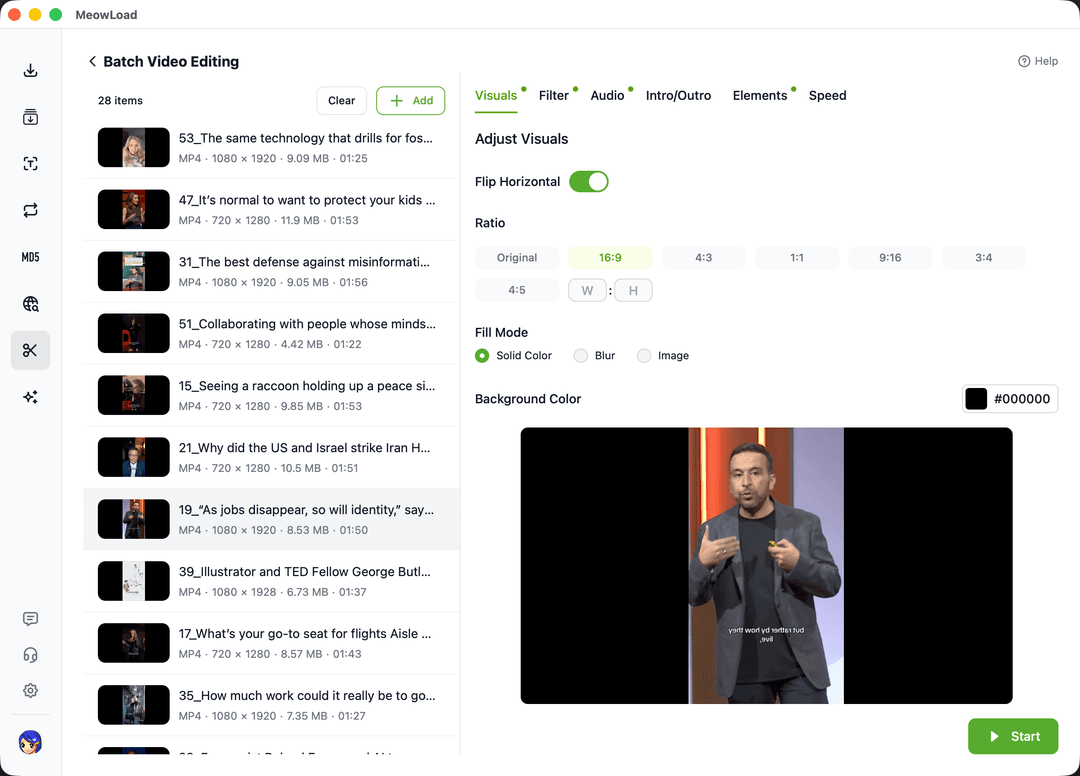
Standardize your video assets for various platforms with automated resizing and visual optimization.
Easily handle ratio mismatches by filling gaps with solid colors, Gaussian blur, or custom brand images to maintain visual appeal.
Apply horizontal flip to all videos at once, effectively altering video structure to assist in content deduplication and creative variation.
Quickly adapt content for TikTok, Instagram, or YouTube using predefined ratio templates that eliminate manual calculation errors.
Streamline your desktop workflow by automating repetitive canvas and ratio adjustments.
Select multiple local video files or entire folders to load into the batch processing queue instantly.
Choose your target aspect ratio, background fill mode, and toggle mirroring options while previewing the results.
Click start to process all tasks automatically, saving normalized videos to the original directory.
Combine multiple automated tools to create a seamless and professional video production line.
Add logos or text overlays to all resized videos in one operation.
Strip original audio from multiple clips to prepare for new voiceovers.
Apply consistent color grading and styles across your entire video series.
Automatically cut out dead air to create tighter, more engaging content.
Start your batch resizing journey today and turn hours of manual cropping into seconds of automated processing.